How to Tell If a Sextortion Email Is Real or a Fake: Signs, Proof, and What to Do Next
Think a sextortion email might be real? Learn the red flags, what “proof” actually looks like, and the exact steps to protect accounts and report safely.


 Fake Account Detection & Removal
 DMCA Takedown Service
 Onlyfans Creator Protection
 Private Photo Protection
 Revenge Porn Removal
 AI Image Abuse Detection
 For Creator
 For Individuals
 General
 Twitter Shadowban Test
 Instagram Shadowban Test
 Tiktok Shadowban Test
 Creator Platform Comparison Tool
 OnlyFans Restricted Words Checker
 OnlyFans Caption Generator
 Blog
Blog DMCA Guides
 Affiliate Program
 Email
Email X(Twitter)
 Telegram
On December 24, 2025, X (formerly Twitter) rolled out a new AI image editing feature powered by its Grok AI system. This new tool lets any user — even someone who didn’t post an image — generate AI-edited versions of public images using simple text prompts. While X markets this as a creative enhancement, the feature has already sparked major controversy over privacy, copyright, and misuse concerns among artists, creators, and everyday people. In this article, we explain what the feature does, why users are upset, the risks it poses, and practical steps you can take — including monitoring your image usage with tools like Erasa’s reverse search.
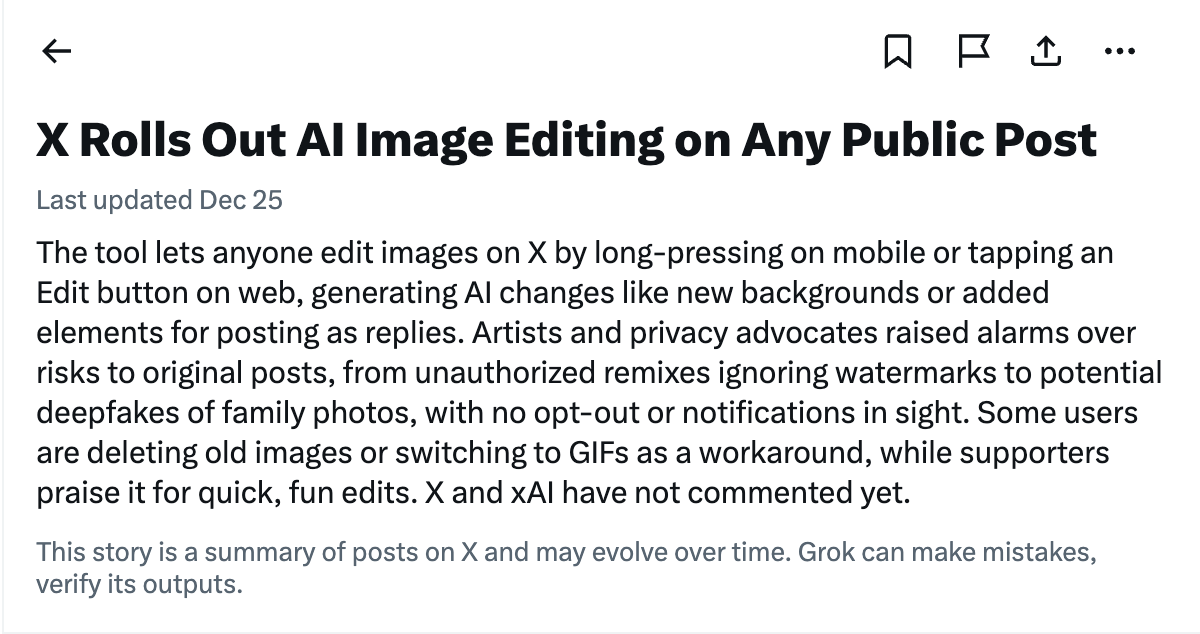
X’s new AI image editing feature is a built-in generative tool that lets users apply AI transformations directly to any image posted on X. Once available to your account, you can click “Edit Image” on public pictures, type a text prompt describing how you want the image changed, and X’s Grok AI will generate a new version within seconds.
This works on both web and mobile: on desktop you click an icon or three-dot menu on the picture; on mobile you long-press an image to open the edit prompt. After editing, the AI-generated image can be shared as a reply post or downloaded by the user.
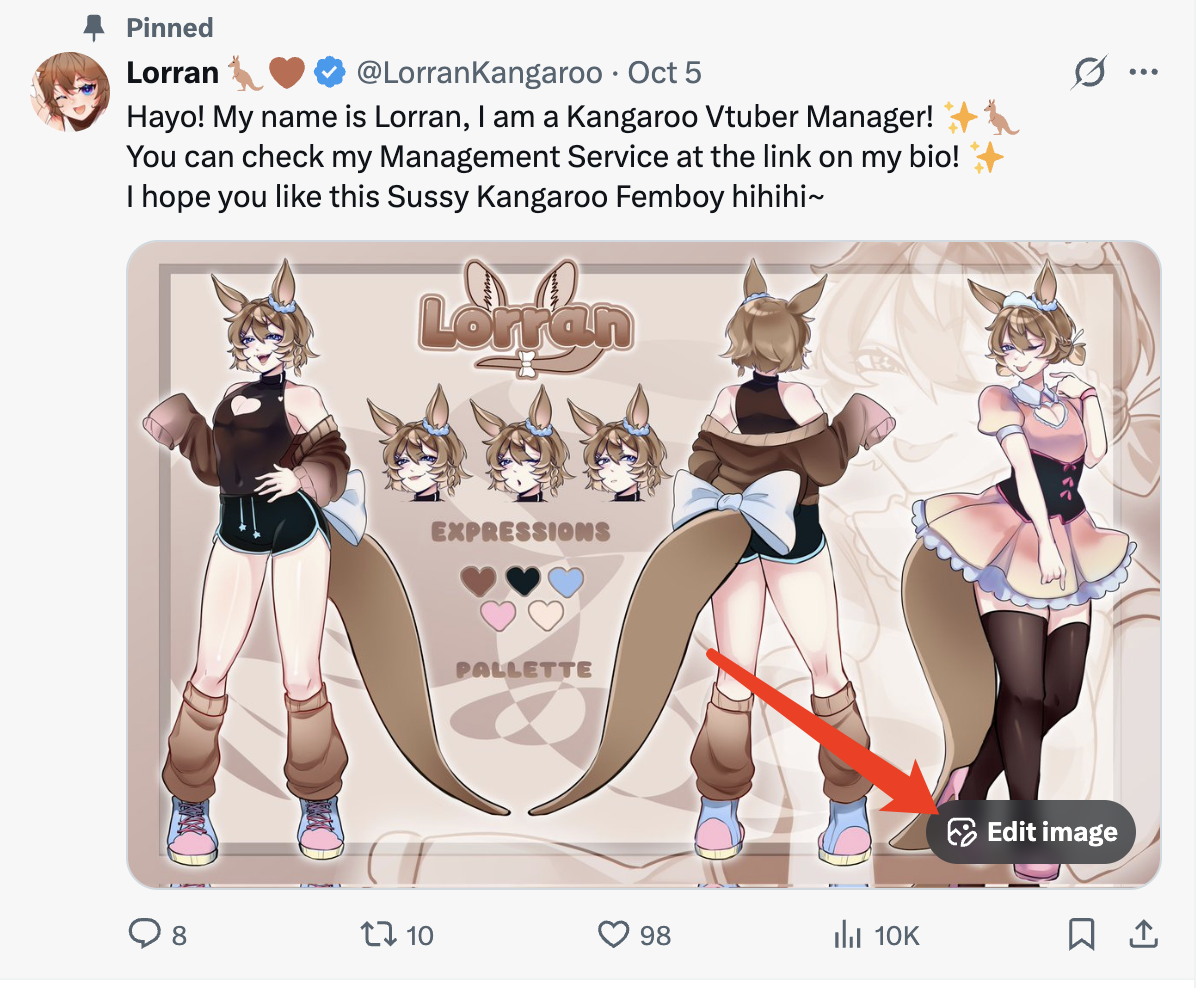 Crucially, this feature does not require the consent of the original image owner. Once an image is posted publicly, other users can generate altered versions directly within the platform interface. These AI-modified images can then be reposted, shared, or downloaded, potentially extending far beyond the original context in which the image was shared. From a privacy and rights perspective, this represents a significant shift: public visibility on X now implicitly allows third-party AI transformation, regardless of the original intent behind sharing the image.
The response from X users — especially creators and artists — has been overwhelmingly focused on privacy violations and copyright concerns, not amusement. Shortly after the feature launched, visual artists took to X to voice sharp criticism that the platform had introduced the AI image editing tool without consent mechanisms or opt-outs, meaning anyone can modify publicly posted artwork or photos at will. Many warned this could lead to unauthorized edits, misuse, and even harassment.
Animator and visual effects artist Seter (@SeterMD) publicly posted that “They straight up added new feature and anyone can just edit your image you posted… So far it seems like there is no way to turn it off,” directly underscoring the lack of control creators have over their own work. Another user described the situation as a risk not just to art, but to personal privacy, noting that “anyone can use AI to edit images of real people posted on this platform… Why is this enabled by default without consent.”
Critics have also highlighted how the feature could be used to remove watermarks or signatures, essentially undermining artist attribution and copyright protections, and expressed concern that edited images — once downloaded — lose context about their origin or consent status.
Some creators have gone further, announcing that they will stop posting images on X altogether or migrate to alternative platforms precisely because of these unresolved risks.
One of the biggest risks with X’s AI image editing feature is losing control of your own likeness. Once a photo is public, other people can generate new versions the subject never agreed to — or even imagined.
In one widely shared incident on X, someone posted a normal photo of a friend, and another user replied by tagging @Grok and prompting it to generate more “intimate” edits (like a kissing version). The moment resonated because it showed how quickly a casual, real-world image can be steered into something inappropriate — without the subject’s consent, context, or any meaningful accountability.
For individuals, the privacy risk isn’t just the edit itself — it’s distribution. Once AI-edited variants exist, they can be copied, reposted, and recontextualized beyond X, where any labels or disclaimers may not follow. X users have also raised fears that edits can bypass visible attribution (like watermarks), making misuse harder to track.
When that happens, the first practical problem is discovery: where did the edited images spread? Erasa’s reverse face search can help you quickly check whether your photo (including altered variants) is showing up elsewhere online — so you can act before it escalates.
For creators and rights holders, the implications extend into copyright and intellectual property territory. AI-generated edits may qualify as derivative works, yet are created without the original creator’s authorization or participation.
Reported issues include:
These developments challenge traditional assumptions about ownership and attribution on social platforms. While copyright law has not yet fully adapted to platform-native AI editing tools, creators are increasingly concerned that enforcement and takedown processes will lag behind the speed of AI-generated misuse.
Creators have been sharing a practical workaround: posting certain images as GIFs instead of standard JPG/PNG can remove (or at least reduce) the in-app “Edit image” pathway, while still letting you publish visuals normally. This isn’t perfect, but it’s a lightweight change you can apply selectively to your most sensitive or high-risk images (e.g., personal photos, client work, paid commissions, faces).
Because the backlash includes concerns about edits that “ignore” or effectively bypass watermarks, many creators are shifting from a single small corner watermark to more resilient patterns: larger marks, multi-point placement, or tiled overlays that remain visible even after common crops and AI edits. The goal isn’t to make theft impossible — it’s to make clean misuse costly and obvious.
If someone reposts an AI-edited version of your image, the most direct lever is often a copyright complaint / DMCA through X’s official forms (especially if you own the rights to the original). Start with X’s copyright policy page and the DMCA form so you’re using the channel X explicitly documents.
If the issue is about your personal privacy (e.g., your photo used in a violating context), X also provides privacy-reporting flows—use those when copyright doesn’t fit the scenario.
Can I turn off X’s AI image editing feature for my posts?
As of the rollout discussions, creators report there’s no clear opt-out for preventing others from using the “Edit image” flow on public images.
How does the feature work — and where do people access it?
X’s trending explainer describes access via long-press on mobile or an Edit button on web, where users type a prompt and generate a modified image.
Will I be notified if someone AI-edits my photo?
Current discussions around the rollout highlight the absence of built-in notifications, which is part of why creators are concerned about detection and accountability.
If someone reposts an edited version of my image, what’s the official way to remove it?
Use X’s copyright complaint / DMCA process if you own the rights to the original image. Start here: X copyright policy and DMCA form.
Does converting images to GIF really help?
It’s being shared as a workaround by creators reacting to the rollout. It won’t solve everything, but it can add friction to in-app editing while keeping your posting workflow intact.
Think a sextortion email might be real? Learn the red flags, what “proof” actually looks like, and the exact steps to protect accounts and report safely.
Private photos leaked or threatened? Follow this step-by-step plan to save evidence, find reposts, report takedowns, and remove results from Google—fast.
X’s AI image editing feature allows public photos to be modified without consent. Learn the risks and what you can do to respond effectively.
Devastated after a nude selfie leaked? Don't panic. This guide provides immediate, actionable steps to find where your private photos are online, and how to get them removed.