



How to Run a Reverse Search?
 1Pick what you want to checkPick what you want to checkChoose PHOTO, FACE, VIDEO, or USERNAME.
 2Upload or enter your infoUpload or enter your infoDrop an image, paste a screenshot, upload a clip, or type a username.
 3Get your full resultsGet your full resultsSign up to unlock the complete report: matching images, similar faces, copied videos, and duplicated usernames.
What Is Reverse Search?
Reverse search lets you see where your photos, images, videos, or identity appear online. Instead of simple pixel matching like Google Reverse Image Search or TinEye, Erasa analyzes photo similarity, image variations, facial features, and video fingerprints to reveal real misuse.
Reverse Photo Search
Find where a photo or related image appears online — including edited, cropped, filtered, or AI-modified versions.Built to uncover reposts and unauthorized reuse across both major and smaller platforms.
Reverse Username Search
See where your username or handle is being used.Erasa highlights copied profiles, impersonation attempts, and accounts borrowing your identity — something image-only search engines can’t detect.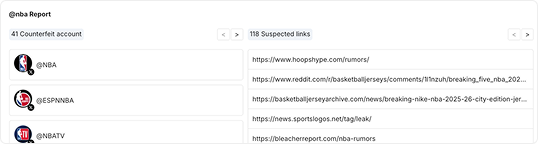
Reverse Face Search
Check where your face shows up, even in altered or low-quality images. Erasa identifies lookalikes, deepfake-style edits, and face-based impersonation with far greater accuracy than general image search tools.
Reverse Video Search
Discover where your videos — or frames taken from them — have been reposted. Erasa detects clipped segments, screen recordings, highlight edits, and full re-uploads that traditional reverse image search engines can’t find.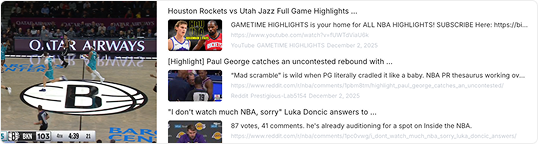
Explore More — Choose Your Search Mode
Pick a search type below and run a focused reverse search.
 Photo SearchReverse Photo SearchCheck where a photo or screenshot appears online.Explore Now →
 Face SearchReverse Face SearchFind where your face or similar faces show up.Explore Now →
 Username SearchReverse Username SearchLook up accounts using your username across platforms.Explore Now →
 Video SearchReverse Video SearchSee where your clips or video fragments are re-uploaded.Explore Now →
What Erasa’s Reverse Search Helps You Uncover
Erasa reveals where your photos, images, videos, and identity signals appear online — giving you visibility that standard reverse image search tools can’t provide.
Reposted or reused photos
See where your photos or related images appear — including cropped versions, edited uploads, AI-modified variations, and reposts across major and smaller platforms.
Copied usernames and identity misuse
Detect accounts copying your username, handle, or brand identity.Erasa highlights duplicates, impersonators, and profiles attempting to pass as you.
Face-based impersonation
Find accounts using your face, filtered selfies, or manipulated images.Erasa identifies lookalikes, deepfake-style edits, and face-focused misuse that generic image search engines often overlook.
Re-uploaded or clipped video content
Track where your videos—or frames extracted from them—have been uploaded.Erasa detects screen recordings, highlight edits, short clips, and full re-uploads that image-only tools cannot catch.
Suspicious profiles or unknown content
Run a reverse search on any photo, face, video, or username to verify whether an account or upload is legitimate.
Why Erasa Is Better?
All your reverse searches — photo, face, video, username — unified in one tool.

More than basic reverse image search
Traditional tools like Google or TinEye only match simple image similarity. Erasa detects edited, cropped, filtered, and AI-modified versions of your photos.

Four search modes in one place
Erasa unifies photo, face, video, and username search — no need to switch tools or run multiple checks.

See where your content appears, instantly
Upload what you want to check and discover where your images, face, videos, or username appear across the internet within seconds.

Privacy-first by design
Erasa processes your uploads securely and doesn’t store your photos, faces, videos, or usernames after generating results. Your searches are read-only, private, and never shared or used for training.
What Creators Say About Erasa





Frequently Asked Questions
Reverse image search is a way to find where a photo or image appears online.
Erasa expands this by supporting reverse search for photos, faces, videos, and usernames in one platform.
Choose PHOTO / FACE / VIDEO / USERNAME → upload a file or enter a handle → create an account to view full results.
This covers “how to reverse image search” and its related long-tail variations.
Yes. Upload a photo or screenshot to see where it appears, including edited, cropped, AI-modified, or reused versions.
This covers reverse photo search / reverse search image / picture reverse search intents.
Yes. Erasa can identify similar or matching faces, even when the photos are filtered, cropped, or altered.
This satisfies reverse face search / face reverse image search queries.
Yes. Erasa detects clips, screen recordings, re-edits, and full re-uploads.
This answers reverse video search / search video reverse queries.
Yes. Enter a username to find copied handles, impersonation profiles, or accounts pretending to be you.
This maps to reverse username search / username reverse search.
Yes. Searches are read-only, encrypted, and never posted or shared.
Erasa does not interact with any accounts you check.
You may remove unauthorized uploads, report impersonation accounts, or take down leaked content.
Erasa provides guidance for each action.
Find Every Place Your Photo, Face, or Identity Appears
Instantly check where your photos, face, videos, or username have been reused, reposted, or impersonated.